
One tool. Every analyst. Any cloud data platform.
Exponam Analyst Intelligence connects business users and analysts to governed enterprise cloud data — directly in Excel. Discover, select, import, and analyze without code, configuration, or workflow disruption.
Discover. Select. Import.
Discover
Browse available tables and columns across connected cloud platforms. See what data you have access to before you decide how to get it.
Select
Three ways to define the data you want — pick the one that matches how you work.
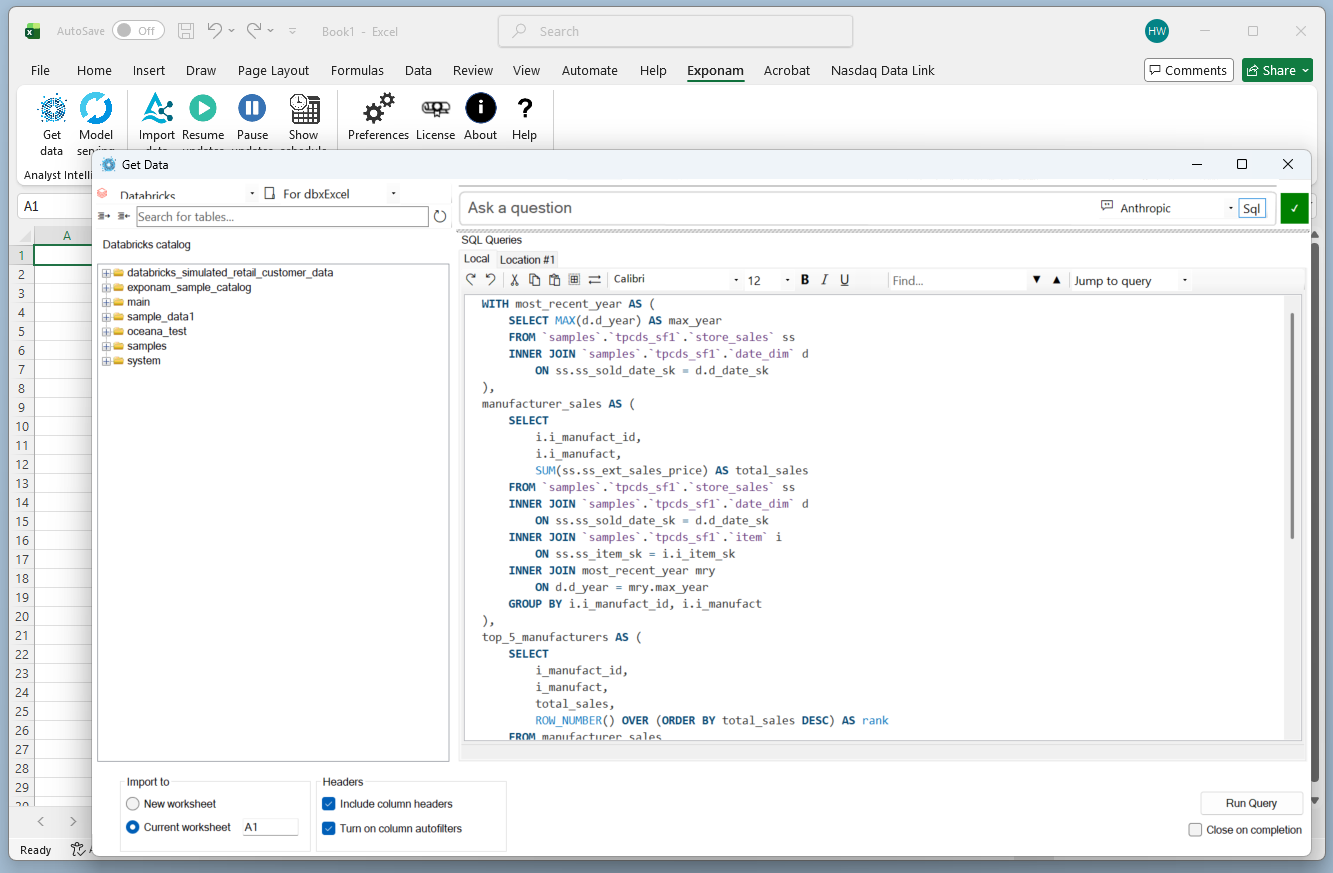
Visual data builder
Point, click, filter, import. No code required.

Import
Data lands in Excel — up to 10 million rows. No exports. No intermediate files. No stale CSVs. Scheduled or manual refreshes. Automatically create PivotTables from imported data and start analyzing immediately.
Governed data, delivered to Excel
Exponam connects directly to Databricks and Snowflake, with additional platforms in development. Authentication, access control, and data governance are enforced by your existing platform security — role-based access, SSO — with no parallel permission system to maintain.
Data never leaves your organization’s perimeter. Exponam is not a SaaS application — no data is routed through, stored by, or accessible to Exponam or any third party. The connection runs directly between your cloud platform and your analyst’s workbook.
Once data is in Excel, analysts work with the tools they already know. VLOOKUP, PivotTables, charts, formulas — everything works as expected, on governed, current data.
Import up to 10 million rows per extract, with no limit on the number of extracts per user. Create updating worksheets that reflect changes in the source data. Build PivotTables directly from cloud data. Schedule automatic refreshes on intervals you define. Filter by date range, column, or value before import — only pull what you need. Save filter configurations as reusable views for repeat access.
Import speeds of 11 seconds per million rows have been benchmarked on direct-download data paths. Performance on SQL-routed queries varies by cloud platform, query complexity, and warehouse configuration.
Free to start
Exponam Analyst Intelligence is free to install and use — import up to one million rows per query with no license required. Enterprise licensing unlocks the full 10-million-row capacity, MSI deployment, and dedicated support.
Your data, your way
Every analyst works differently. Exponam gives you three governed paths to the same result — data in your workbook.
Natural language query
Ask a question in plain English; Exponam translates it into a governed SQL query, runs it on the platform’s SQL engine, and returns visible, reproducible, auditable results to Excel. More on natural-language query
Direct SQL
Write any SQL the platform supports and run it from inside Excel, with a private scratchpad and administrator-curated shared workspaces. More on direct SQL
Visual data builder
Point, click, filter, and import over Delta Sharing – no code, no SQL engine, zero platform compute. Available for Databricks. More on Delta Sharing import
All three paths deliver governed, auditable data into Excel. The choice is about how you prefer to work — the security and governance posture is identical regardless of path.
AI that stays inside your perimeter
Natural language query requires an LLM to translate questions into SQL. Most products send your schema — or worse, your data — to a commercial API. Exponam gives you control.
Choose a fully local LLM that runs entirely within your environment. No data, no schema, no tokens leave your network. For organizations with existing commercial model agreements, connect your preferred provider — Exponam passes only schema metadata, never row-level data. Both options are covered in depth on the natural-language query page.
This is not unique to the AI layer — it is how the entire product works. Exponam is not a SaaS application. No data transits Exponam’s infrastructure at any point. Every byte moves directly between your cloud platform and your analyst’s machine. No intermediary. No third-party exposure. No exceptions.
No shadow AI. No data leakage. No compliance exceptions required.
Databricks machine learning — in a spreadsheet
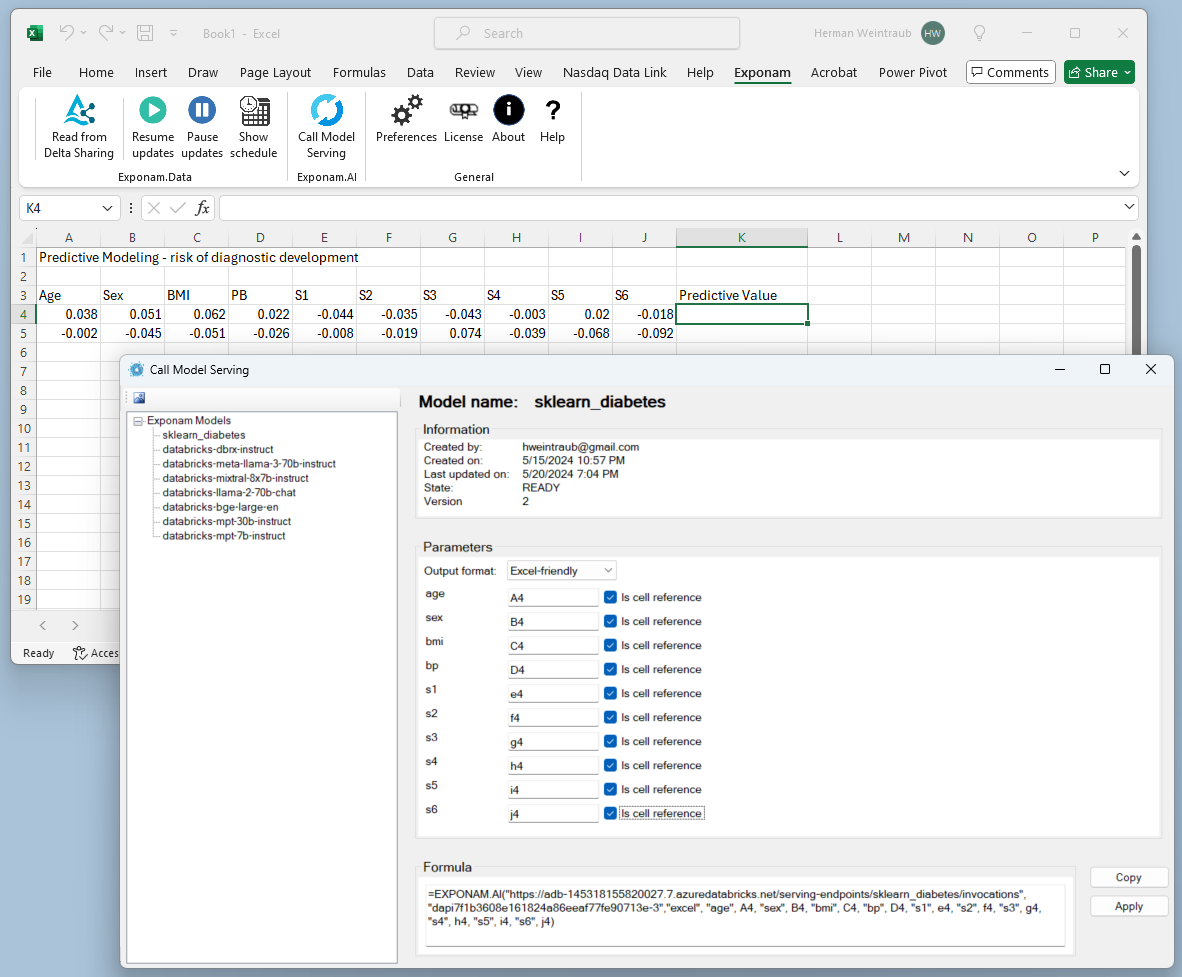
For organizations running ML models on Databricks, Exponam brings model execution directly into Excel. A guided formula builder walks users through the inputs required by any Databricks ML Serving Endpoint — no coding or Databricks knowledge required.
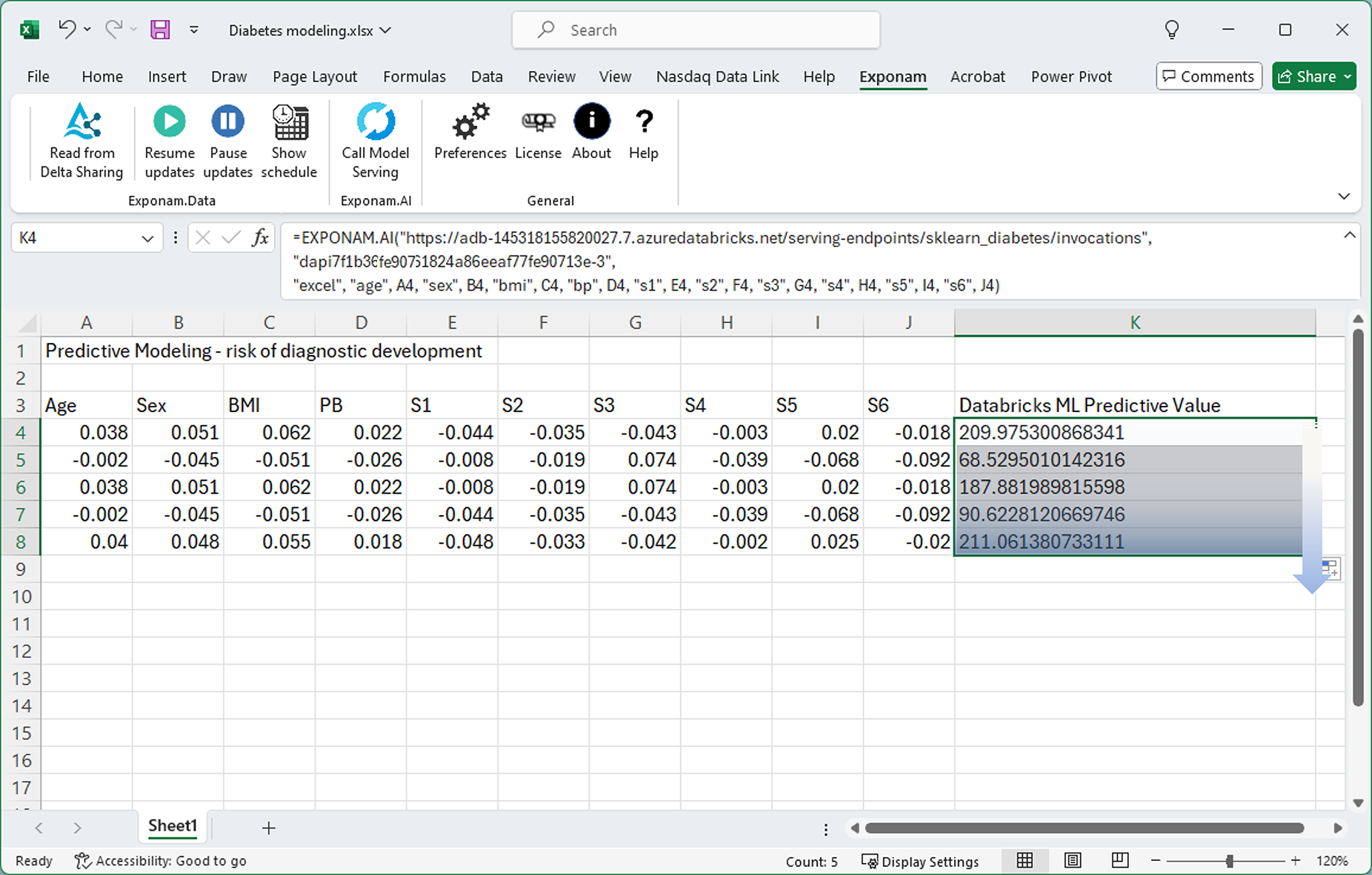
The result is an Excel formula that executes the model and returns predictions inline. Business teams use advanced machine learning right from their spreadsheets — risk scoring, forecasting, classification — without leaving the tool they already know.
How it works
Exponam connects to Databricks ML Serving Endpoints, prompts the user for required input parameters, evaluates the model using Databricks serverless clusters, and returns results directly to the cell.
Formula builder UI
Model execution in Excel
Built for enterprise scale
Exponam Analyst Intelligence supports deployments of 100,000+ seats. The architecture was designed by the co-author of the Microsoft Office COM integration layer — the same technology foundation that powers Excel’s native extensibility.
Zero data exposure
Exponam is installed software, not a SaaS platform. No data — not a single row, not a schema definition, not a query — ever leaves your organization’s security perimeter or transits Exponam’s infrastructure. The product operates as a direct bridge between your cloud data platform and your analyst’s workbook. There is no intermediary.
Platform support
Windows desktop via native VSTO architecture for maximum performance. Enterprise deployment supports Okta and Microsoft Entra ID (Azure AD) authentication, centralized configuration, and silent MSI installation. Mac and web-based Excel support is available for Databricks Delta Sharing, with multi-cloud platform updates in development.
Multi-cloud
Exponam is built as a platform-neutral intelligence layer. The visual data builder is designed specifically for use with Databricks Delta Sharing. A single installation connects to Databricks and Snowflake through one consistent interface. Microsoft Fabric support and native connectors for additional sources are in active development.
Only a platform-neutral approach can meet the enterprise’s needs: perspective from our CTO
Governance
Data access is governed by the source platform’s existing security model. Exponam does not maintain a parallel permission layer — if a user can see the data in the platform, they can see it in Excel. If they can’t, they can’t.
Security and compliance
Our Security Center documents Exponam’s architecture, data flow, authentication model, and compliance posture — including our NIST SP 800-218 attestation for secure software development.
Let your analysts work with their data — not wait for it.
Free to install. Free to use up to one million rows. Enterprise licensing for full capacity and support.